iakov.dev

First week of the level editor

· 1 min read

Video

These features went into the Glow engine editor over the last week. Until now all level geometry was built in 3ds Max and imported into the engine. That is an inconvenient way to edit a game level, and an expensive one, so I started on an editor of my own.

After a week it can do this. Meshes can be dragged and dropped in from Explorer (OBJ format for now, more formats later). A simple asset manager runs as a job in a parallel thread, so parsing 3D meshes doesn’t block the UI.
A short way to build a quaternion from a direction

· 1 min read

A long time ago I wrote a function that creates a quaternion for the rotation from (0,0,1) to any unit vector. It was very long, with asin, acos, several conditions and so on.

Today I came back to it, and after some thought it shrank to the code below. The w component is 1 plus the dot product of the two vectors, which with (0,0,1) is just 1 + dir.z. The x and y components come from their cross product, whose z part is always zero here, and normalising at the end gives the correct half-angle rotation. dir must be a unit vector.

void Quaternion::from_direction(const vec3 dir){
	x = dir.y;
	y = -dir.x;  z = 0;
	w = 1 + dir.z; // simplified dot product with 0,0,1
	normalize();
}

Immediate-mode UI for the editor, scripted in Lua

· 1 min read

I am finally back on the editor. Its UI will be written in Lua scripts.

My starting point was the simple, usable immediate-mode UI code from the Recast library. Here is how a button works there:

if ( imguiButton("Start game") )
	LoadLevel("super-duper mega Quake level.mdl")

Creating the button, drawing it and handling the click all happen in one place. After years of Windows UI programming this was a revelation.

I exposed this API to Lua with the luabind library, and UI script code now looks like this:

if object_selected
	rollout( "Object", 0, 0, width, height )
	show_object_properties()
if  collapse("physics", true, true)
	show_physics_properties()
if  collapse("visual", true, true)
	show_visual_properties()
if  collapse("script", true, true)
	show_object_script()
end_rollout()

A website for the Glow engine

· 1 min read

The engine has its own website now: www.glow3d.com. It took me three days of CSS, HTML and Photoshop.

Together with the feature presentation from last week, this gives the Glow engine a public face. The site is where I will point people who ask what the engine is and what it can do.

Glow engine feature presentation

· 1 min read

I made a presentation of the Glow engine’s features. You can view it on Google Docs.

The engine has changed a lot this year. In February and March it got the ActiveX web player and streaming from zip files, HTTP and FTP. This month I finished a long refactoring that split it into modules (physics, sound, networking, core, AI, UI, archive), each in its own DLL behind an abstract interface, with a thread pool running their jobs. After all that it seemed a good moment to write down what the engine can do.

A month of refactoring

· 1 min read

I spent a month refactoring the engine. It had grown so big that I could no longer keep all of it in my head.

So I split it into small pieces: physics, sound, networking, core, AI, UI and archive. I prepared a solid interface for accessing the engine’s features, which is the part that people using the engine will see. Every module now lives in its own DLL and sits behind an abstract interface, so the modules are cleanly isolated from each other.

I also added a thread pool (boost::threadpool) that runs jobs from the modules. With that in place the engine should scale easily as CPUs get more cores.

Streaming data from the internet

· 1 min read

The web player needs data from the internet, so I had to implement streaming. It works now, through an extra layer that sits between the engine and wherever the data comes from.

That layer supports several kinds of data source:

  1. The usual file system
  2. Zip files
  3. Files from the internet, over HTTP or FTP

The last piece missing is an installer for the ActiveX control. I haven’t decided yet how to install it properly: as a separate MSI installer, or the usual ActiveX way, where the browser downloads and installs it.

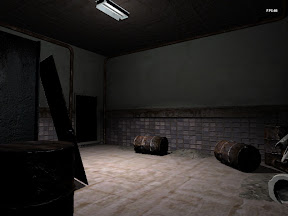
A dark basement room with barrels, rendered by the engine

Starting the web player

· 1 min read

Today I started on a web player for the Glow engine, and there are results already. I created an ActiveX control based on ATL, attached the engine to it, and the whole thing runs in the ActiveX Test Container without problems.

ActiveX means it only works in Internet Explorer for now. Firefox and Chrome will need their own testing later. A player in a browser also can’t count on finding its data on the local disk, so the engine will have to learn to load files from the internet as well.

First tests with water

· 1 min read

Video

The video shows my first tests with water in the engine. The method comes from chapter 19 of GPU Gems 2, and it is two-pass rendering: the scene is drawn once for refraction and once for reflection before the water itself goes on top.

  1. Render everything except the water. This is the refraction pass.
  2. Copy the image into the refraction map.
  3. Render everything again from the “reflected” camera, which is the camera position mirrored across the water plane.
  4. Copy that image into the reflection map.
  5. Render the water using the reflection and refraction maps.

Feedback from the IGF judges

· 1 min read

The IGF judges have sent their comments on my game, Little Zombie Susie. They are right. I spent more time on graphics and programming than on the gameplay and the level.

So from now on I want more time on gameplay and play testing, fresh ideas, design documents and so on.